
It's been a while since our last roundup, and a lot of that time went into two things we announced individually but never gave a proper introduction on this blog: Ample Agent Pro and the revamped post-login Dashboard. Both earn a spotlight here, alongside the most-voted supporter feature, real-time collaboration, and a long list of customer suggestions brought to life.
This post covers everything shipped since the beginning of 2026. As always, the full, unfiltered list of every merge is public in our product changelog.
link👑 Headlining Features
AI is transforming what's possible, blah blah blah. Like most people, we're bored of hearing about how AI is going to unlock a fantastic new world. What matters isn't the pie-in-sky promises. It is "do these new features create practical, everyday benefits?"
The upside of tapping into LLMs to create everyday value for Amplenote users? A recently-unthinkable level of task/context alignment. If every good idea has its day, and every good day includes finishing mood-aligned tasks, our opportunity is to help guide users to discover what they didn't know they really wanted to work on today.
And when you've finished your best ideas, Goal Coach can suggest new "best ideas" that are consistent with your quarterly goals.
link🖥️ Spotlight: Mission Control Dashboard
Back when Amplenote first launched in 2020, we spent a lot of time trying to drive attention on Reddit. While new users slowly began to discover Amplenote's existence, every day we'd see the /r/notion crowd showing off their meticulously-arranged custom landing page. Their screenshots weren't just lipstick — they captivated the imagination by combining a bunch of planning tools into an elegant, one-page wrapper.
The payoff for a carefully-arranged package of note, calendar and task details on one page? It acts as a springboard to jump into "get stuff done mode" without clicking through 10 different notes to load your past analyses into memory. Given all the Deep Life podcasts we've consumed over the past year, it felt natural that the focal point for this dashboard would be quarterly goals:
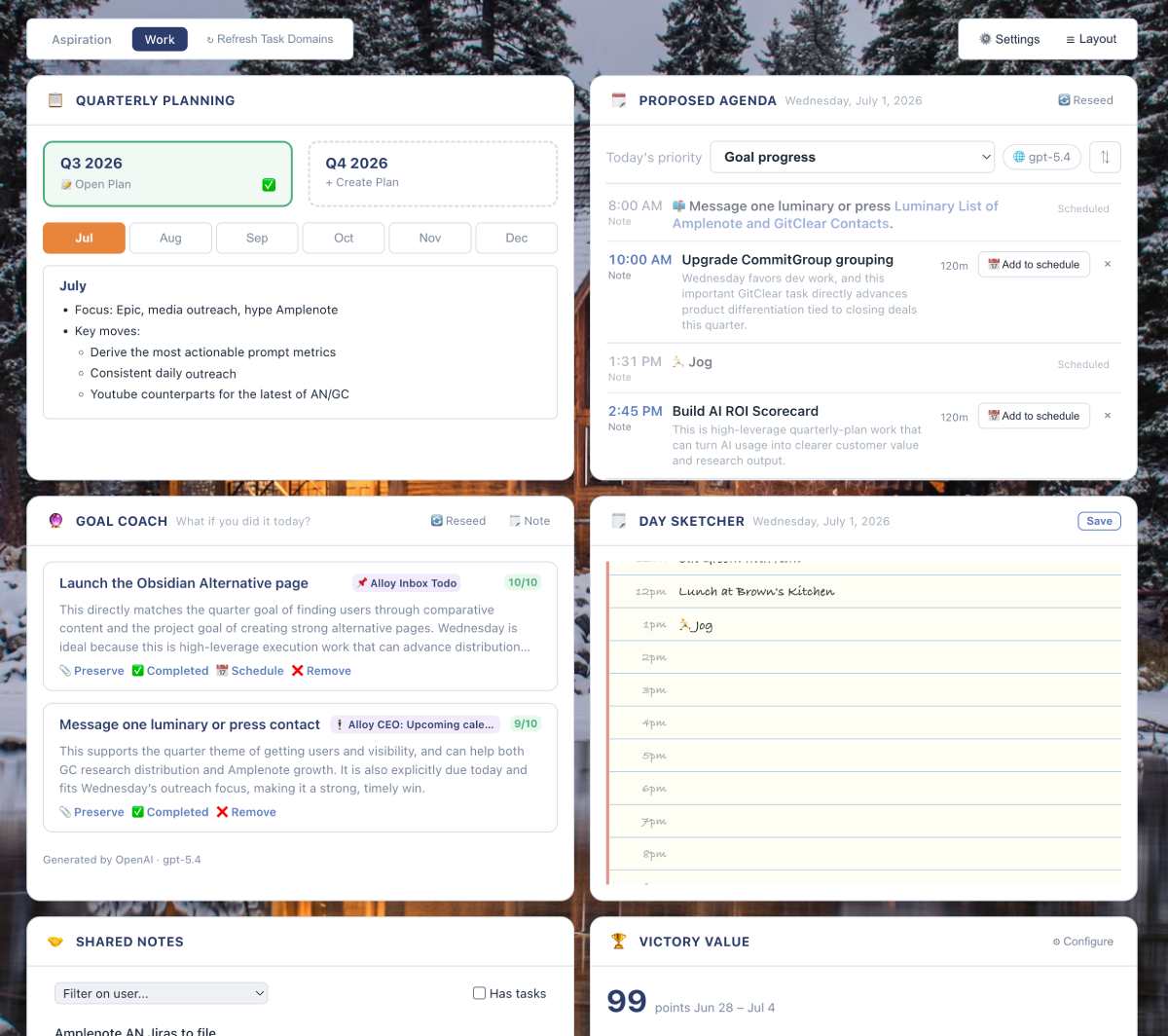
Dashboard leverages quarterly plans to pick out high impact tasks
The Mission Control Dashboard has progressively evolved, and now features the components you know and love, like...
Quarterly plan. Take a few minutes to decide what matters most this quarter and it'll get done.
Proposed agenda. Task recommendations that fit into your existing schedule
Goal coach. Which tasks form the best blend of today's existing schedule with your quarterly goals?
Day sketcher. Low commitment means to sketch out where hours of the day might be spent
Shared notes. What notes have collaborators changed lately? What notes are shared with specific collaborators?
Victory Value. How much got done per day, and how did you feel while you were doing it?
Task agenda. What's scheduled (via Amplenote or external cals) for today and tomorrow?
Inspiration quotes. A spark to get going.
Task retirement center. Ideas for tasks to let go of.
Revisit candidates. Jump back into notes that you visit periodically (e.g., "Vacation ideas")
Mood rating. What's the point of working hard if you're not enjoying the process?
Calendar. Control what dates are shown in the Task Agenda component.
Quick actions. Jump into random note, rescoring tasks, journaling, etc
Peak hours. Which hours of the day have been most fruitful for ideas brainstorming/GSD
Click the "Layout" tab to drag components in and out, depending on what you know will get you out of the starting block most reliably.
What do you want to see in your dashboard next? An empty box to sketch in? Pictures? Shared board with collaborators? Improvements to an existing component? Drop a line in the comments and let us know your thoughts.
Rounding things out: a desktop widget focus mode for when you want to work in just one widget without the rest of the dashboard competing for attention. Click on the icon at top-left to focus it. Hold on the title bar of a component to drag it.
link🤖 Spotlight: Ample Agent Pro
We shipped Ample Agent Pro a couple months ago without giving it an Roundup Post writeup, so let's fix that. Ample Agent Pro is the toolbox of every LLM feature we have wanted, or heard users request. It's an agent that lives inside your notebook to search your notes, run deep research, work on tasks, adjust note content, etc., using whichever frontier model you like.
But best of all, it picks notes. Ok, maybe a controversial take, but: the CEO's favorite Agent Pro feature, by far, is the Cmd-. (Ctrl-. on PC) hotkey from Quick Task Add or Calendar Pane (on mobile, it's a button). I've got around 20-30 notes that hold live tasks, and picking which note a new task should belong to has been a pain endured since I began using task apps. Granted, it's a ~15 second pain, but 15 seconds times 5 ideas per day = a lot of annoying seconds. The new hotkey makes 5 guesses on "which note has tasks most consistent with this task?" In less than 5 seconds, it averages a ~95% hit rate for guessing the best target note among its 5 results.
It even does a few other things:
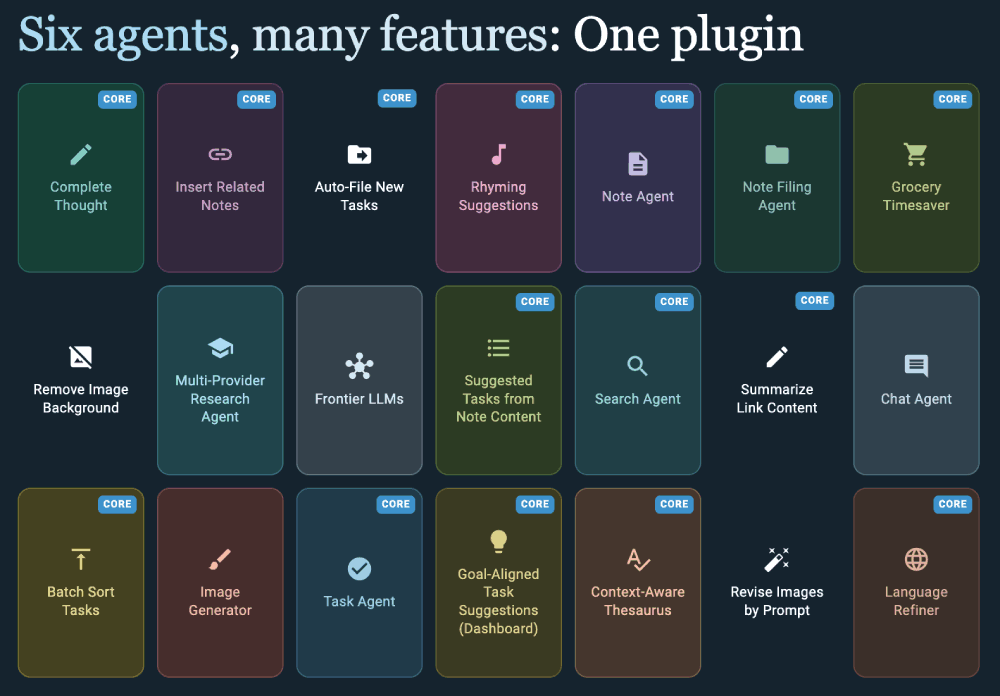
Current roster of Ample Agent Pro features, new ones added monthly. Most recently added: Task Rescorer
Read the docs if you'd like a full rundown of its up-to-date features.
It's latest feature is Task Rescorer, an interactive popup where the agent proposes Task Score adjustments based on your daily whims.
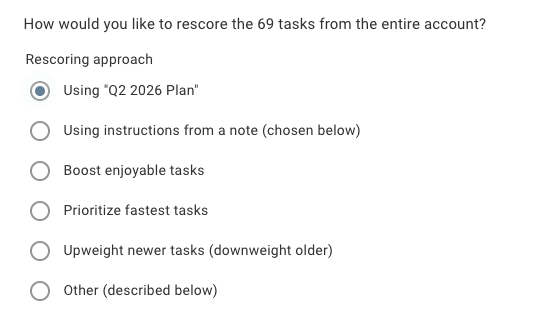
Weight tasks by current mood
You click to accept or reject each updated score, and you can run it against a single tag, a curated source, or your whole dang account.
Search Agent, the multi-phase note retrieval feature that quietly powers some of what Ample Agent Pro does under the hood, also picked up better handling of how many results it returns, so if you ask for "the top 3" it actually gives you 3. We’ll be continuing to improve Search Agent soon, to deliver faster results and potential interactivity.
link🔌 Meet the Amplenote MCP Server (#1 Voted Feature)
If you've wanted an AI to actually work inside your notebook — not just answer questions about it, but read, write, search, batch update, and reorganize your notes on your behalf — this update is for you.
Amplenote now runs a local MCP server from the desktop app, which means Claude Desktop, Claude Code, and OpenAI Codex can all connect directly to your notes, tasks, and task domains. One-time setup is described here, after which your LLM of choice gains the same abilities a trusted collaborator would get: creating notes, searching and filtering, reading note content as markdown, inserting or updating tasks, and just like, whatever.
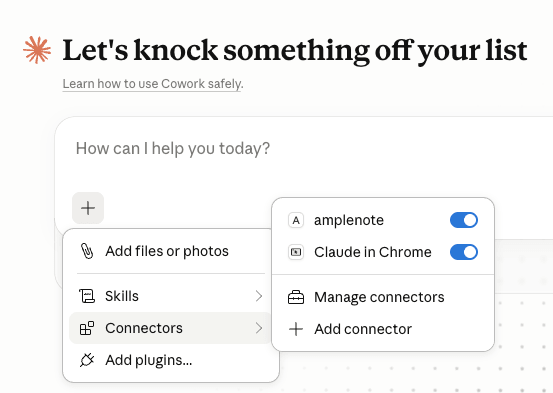
Once connected, "amplenote" shows up right in Claude's list of connectors
What makes this different from Ample Agent Pro isn't capability so much as where it runs. The MCP connection lives in a totally separate window with its own memory and resources, so a long-running request doesn't tie up the Amplenote app you're actively working in. That makes it a great fit for the kind of multi-note, multi-step cleanup jobs that are tedious to do by hand but easy to describe in a sentence:
Weekly review, assembled for you: "Search my completed tasks and recent notes from this week. Create a 'Weekly Review' note with wins, unresolved decisions, and next week's priorities."
Stale task triage: "Find open tasks older than 60 days. Suggest which to delete, defer, or rewrite — don't change anything until I approve."
Cross-linking a whole tag: "Review notes tagged 'project/onboarding' from the past year. Where a note relates to another, add a 'Related links' section linking to the most relevant one."
A couple of things worth knowing before you dive in: the MCP server only talks to 127.0.0.1, so Amplenote Desktop needs to stay open while you're using it, and the connection is protected by a private bearer token that you should treat like a password. Full setup steps for all three providers — plus a troubleshooting section for the inevitable JSON typo — are in the MCP server help doc.
link👥 Real-time Collaboration
As we draw ever-nearer to task assignment, we’ve spent a good chunk of time this quarter improving the experience of working together on a project.
Now, not only will you be able to see which collaborators are looking at a note, you can also see where their cursor is moving, with more frequent note syncing when two users are working together in a note.
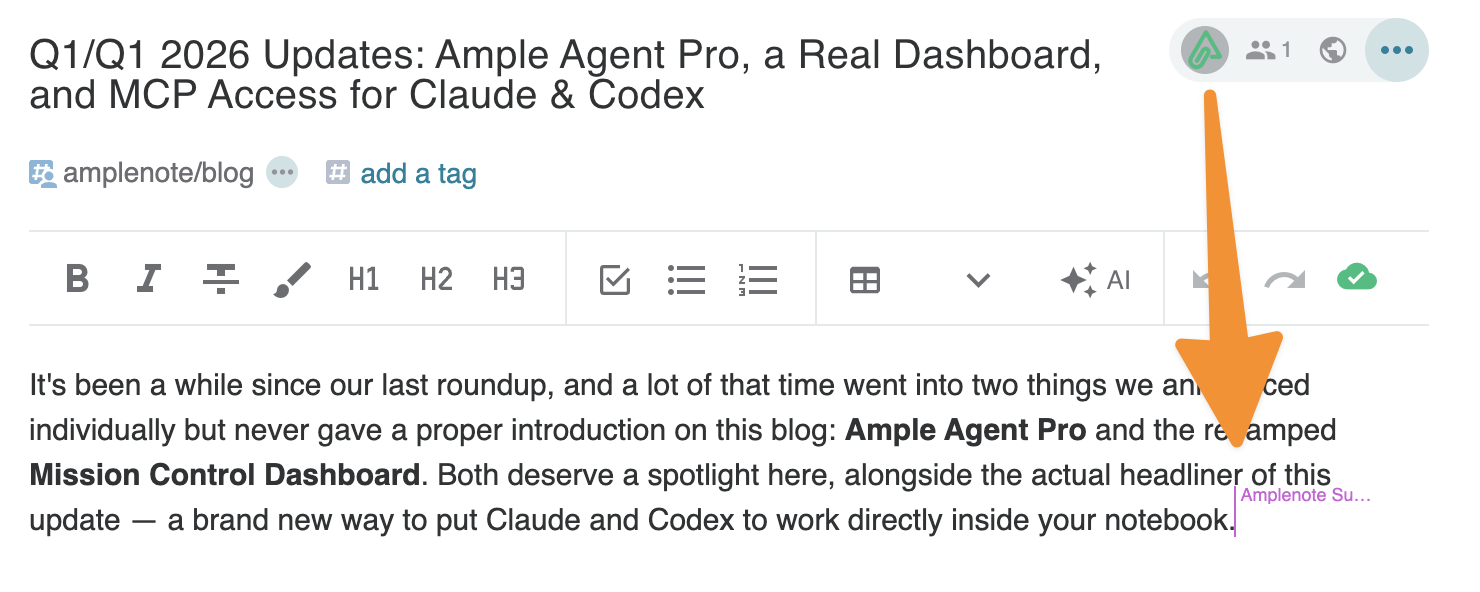
When a collaborator is working in a shared note, you'll see their cursor reflect their edition position
Amplenote won’t be imminently mistaken for Google Docs as a “work together in the same paragraph”-type of interactivity. But between the collaborator cursors, special attention to allowing multiple tasks to be edited concurrently, and the new Shared Notes Dashboard module that calls out which notes have changed since you last reviewed, there is an increasingly strong case for Amplenote to act as your team’s lightweight alternative to Jira (one-line bug report with an image or two pasted into the text, anybody??)
link👂 More customer-inspired upgrades
Beyond the headlining features, behold the progress on several customer-requested improvements.
link📝 Merging notes allows incorporating changed files from disk
The "merge note into another note" action — available from the note menu's "More Options" choices — moves all content from the source note into the target, including tasks and completed tasks, updates any existing links to point at the target note, and cleans up the original:
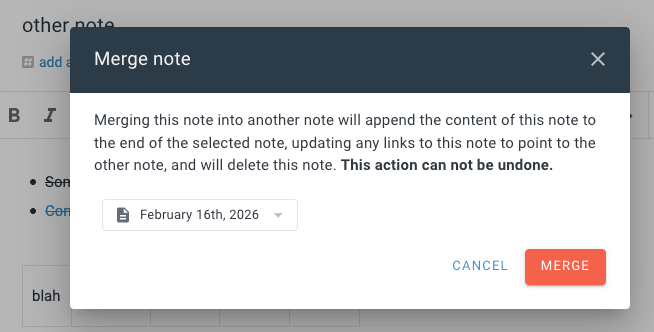
Merge note into another note: content, tasks, completed tasks, and incoming links all come along for the ride
This one shines when you want to edit the markdown file for a note that is saved to a local disk, then re-import the edited content into your Amplenote account.
link🔃 Rearranging headings is now a hotkey (#5 voted request)
With your cursor in a heading, cmd+shift+↑ / cmd+shift+↓ (or ctrl+shift+↑/↓ on Windows) swaps that section with the one above or below it:
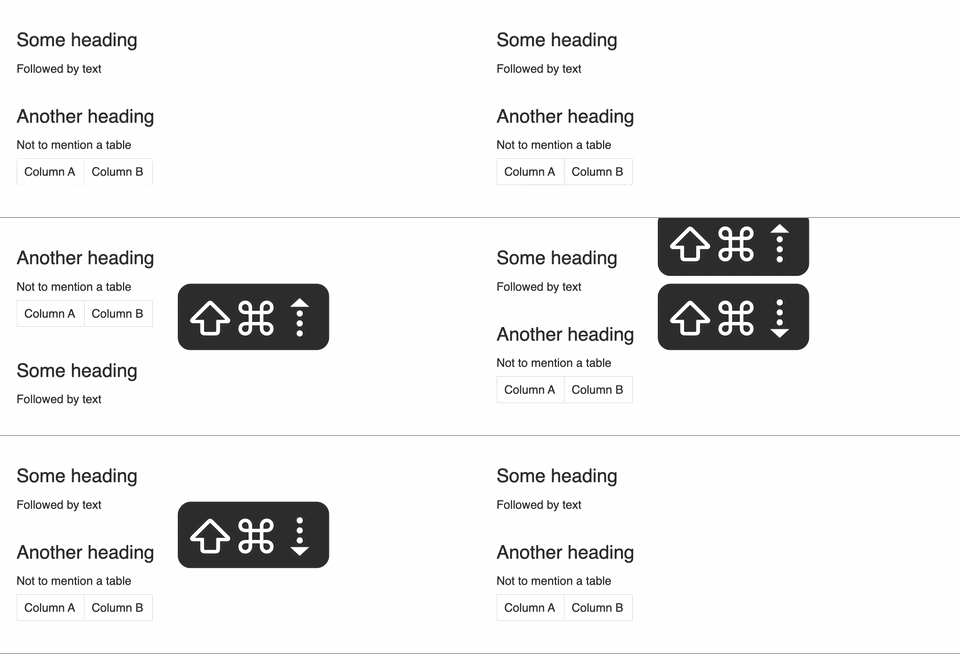
Move an entire section up or down without touching the mouse
Plus a few more editor upgrades worth knowing about:
Insert related note links: the /insert links slash command now surfaces links to notes similar to the one you're in, based on name and content.
"Show more completed tasks" for older notes: this option now reliably appears in older notes too, not just ones created recently.
Directory import fix: markdown notes now import correctly from your chosen folder even after you've changed which directory you're pointed at.
One-click "Replace Markdown": the action is now surfaced directly in the selection menu, so replacing markdown syntax no longer requires a second click in most cases. Also fixed a couple cases where the "Convert markdown" wouldn't be visible when markdown was selected.
Better paste handling for AI-generated text: clipboard content that looks like markdown (say, pasted from ChatGPT or Anthropic) is now run through the note editor's markdown parser instead of being dumped in as plain text, so headings, lists, and bold formatting come through intact.
link👀 Peek Viewer & Navigation
The Peek Viewer picked up a handful of frequently-requested refinements: a new slash-menu option to send the Peek Viewer to the top of your open panes, plus a broader set of Peek-Viewer-specific options in that same menu. You can also now swap a sidebar note with the main note directly from the peek viewer:
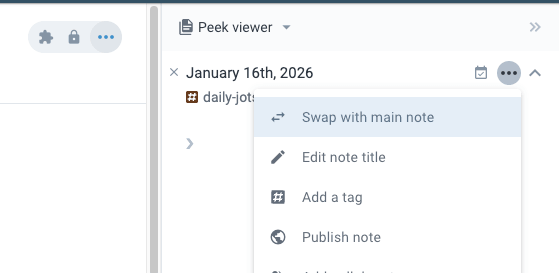
Swap any peeked note with your primary note
We also fixed the quick-open filter categories menu getting cut off vertically depending on your window size — it can now expand outside the quick-open popup rather than clipping.
link🧑🤝🧑 Referencing People
A cluster of changes have been implemented around how Amplenote recognizes content involving people. Notes associated with a person (@@person name) now display with distinct icons and naming in your notes list. Linking to a person (via [[@ or @@) surfaces a Rich Footnote preview showing that person's associated note content, avatar, and display name. We also added a dedicated person screen — a standalone view for everything connected to a specific person:
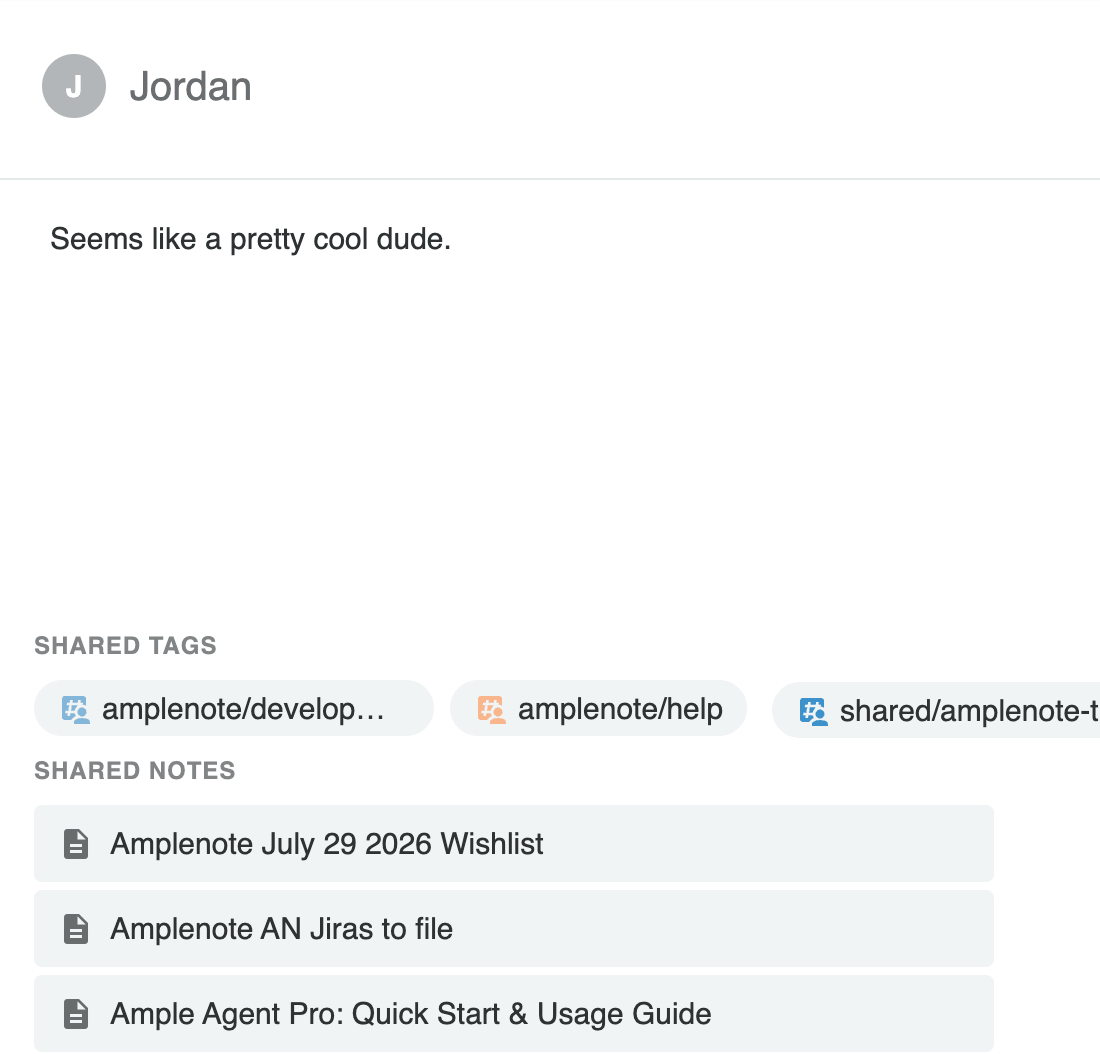
A dedicated screen for viewing info and notes tied to a specific person
On the collaboration side, the Dashboard's Shared Notes component was introduced. It allows per-person filtering and pagination, with a "Has tasks" toggle, so finding what a specific collaborator has touched is a lot less like scrolling through everything.
link📱 Mobile & Platform
Apple Shortcuts, meet Amplenote: Amplenote actions are now available as Shortcuts on iOS, with a guided setup flow to get connected.
iOS layout fix: config popups and modals in Dashboard no longer get pushed off-screen on iOS
Continued Android and general mobile stability work, including fixes to note appearance not refreshing consistently after layout changes.
link🧩 Platform & Plugin Powers
Plugin authors got another load of upgrades that we wanted while building Agent Pro and Dashboard:
Introduced app.context values: checkForUpdates, cloneEmbed, lightDarkMode, renderEmbedTarget, setStatus, subscriptionLevel
Async plugin definitions are now supported — a plugin definition can return a promise, which will be awaited before Amplenote uses the resulting plugin object.
We also shipped a v2 Help Center, reorganized around videos, plugins, and inspiration content rather than a wall of text, including a new "Inspiration" section for discovering plugins and templates from the community:
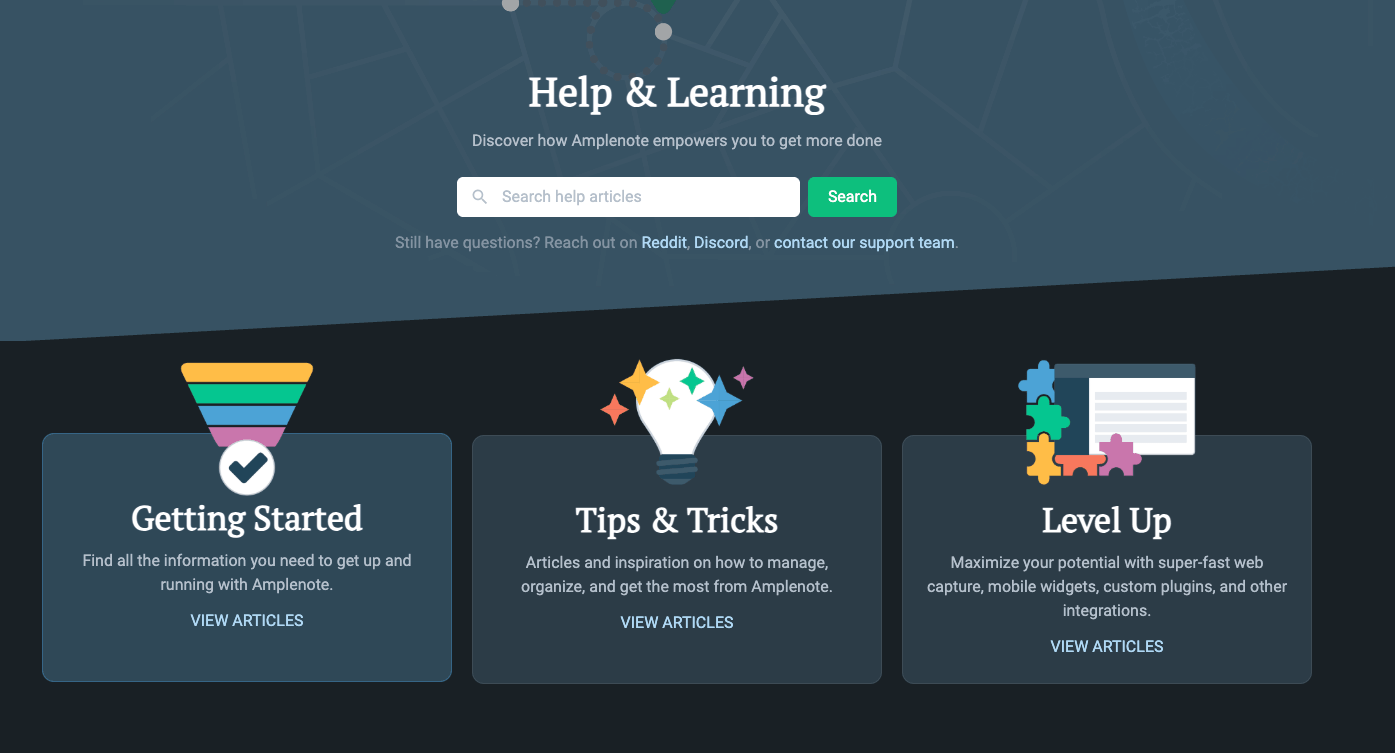
The v2 Help Center leans on video and community content instead of dense documentation pages
It's surely a matter of time until it also let's you search in real text. Vote for it here if you want to see that time come more sooner than later?
link🗳️ Suggested Feature Upgrades
It's now easier to see how many votes you have available.
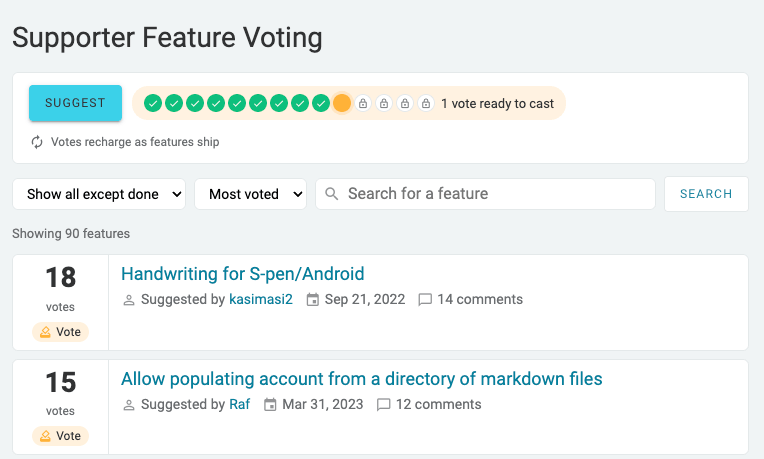
Upgraded feature voting experience
link🐛 Also Fixed
A quieter-but-still-meaningful batch of fixes:
Recurring tasks with specific hidden/start times no longer risk getting duplicated across unrelated notes when completed outside the note editor.
Fixed a bug where marking a task as blocking another task in the same note could intermittently create a doubled link.
Menus like the selection menu now correctly reposition after a dependency upgrade briefly broke that.
Note titles no longer snap the cursor back to its pre-save position mid-edit.
link🔮 Looking Forward
The throughline across all of this (Agent Pro, Dashboard, MCP server) is the same one we flagged last time: personal analytics and AI-assisted execution are converging. The MCP server in particular opens the door to a different flavor of working with Amplenote, where the agent isn't a feature you visit but a collaborator with standing access to your whole notebook.
If you've got opinions on where any of this should go next, our Suggested Feature board now allows submitting an idea for Agent Pro alongside the main website, or mobile. What have you had Claude or Codex do inside your notes via MCP? We'd love to hear about it.

Comments
Login to leave a comment