linkPlugin API Reference Documentation: Plugin creation
To create a plugin, you'll need a note that contains two things: a table of plugin information, and a code block containing the Javascript code of the plugin.
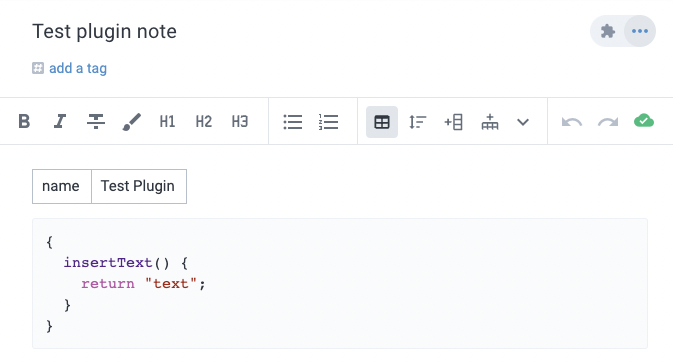
linkMetadata table
A plugin metadata table contains (at least) two columns: the name of the setting, and a value for the setting.
setting name | setting value |
The setting name is not case sensitive. All columns are interpreted as strings.
linkname
The only required setting is the name of the plugin, which can be defined as:
name | Plugin name here |
This is the name that the user will see when invoking the plugin, and will be used as a prefix in cases where the plugin defines multiple options presented to the user.
linkicon
The name of a Material Design Icon that will be used to identify the plugin. If not provided, a generic "extension" icon will be used.
icon | search |
linkdescription
A short description shown when installing or configuring a plugin.
description | Count the number of words in a note. |
linkinstructions
More detailed information about using the plugin that will be shown if the plugin is published to the Plugin Directory.
instructions | Here are some helpful words of advice on using this plugin: |
linksetting
Defines settings that the user can provide to configure the plugin. The user will be able to supply a string for each setting when configuring the note as a plugin. When plugin code is invoked, it has access to the settings values that the user has provided. All setting values are provided as strings.
setting | API Key |
This setting name can be repeated multiple times to define multiple settings.
setting | API Key |
setting | Name |
linkCode
The first code block in the note will be used as the plugin's code. Any subsequent code blocks will be ignored. The plugin code should define a Javascript object. Any functions defined on this object that match the name of an action will register the plugin to handle that action.
To define multiple actions for a single action type, make the action-named field an object. The keys should be the name of the action, with the corresponding function as the value.
Plugin actions can either be a function - as shown above - or an object with run and check keys with functions as the values (see actions section for further explanation):
and:
When plugin code is invoked, the plugin object will be this, for example:
The plugin object will be instantiated when the plugin is installed in the client, retaining any state until it is reloaded (e.g. due to the plugin code being changed in the source note).
Plugin action functions (both run and check) can return promises, which will be awaited.
Or, they can use async/await syntax:
The first argument passed to a plugin action function is an application interface object that can be used to access settings and call into the host application itself.
linkAccessing settings
Given a plugin with the following metadata table entry:
setting | API Key |
A plugin can access the setting through app.settings:
linkAction function arguments
For action functions that receive arguments, the app argument will still be the first argument, before any other arguments:
When using check and run functions, they will receive the same arguments as the action would. So for the linkOption action, for example:
linkLarge plugins: keeping the payload out of the code block
The rule above doesn't change: the first code block in the note is still the plugin's actions, and that's still required. But if your plugin needs to ship a large payload — a compiled embed document, a client bundle, a big data file — you don't have to inline it into that code block. You can upload it as an attachment on the plugin note instead, and fetch it at render time.
Why this matters: a multi-hundred-KB code block makes the plugin note itself slow to open, in every client, for every user, whether or not the plugin is actually being used. Keeping the code block lean and shipping the bulk of the payload as an attachment avoids that cost.
To be explicit about the likeliest misreading: this is a delivery mechanism for the payload your actions load, not a substitute for the actions themselves. The code block is still required, and it's still where your plugin's action functions live.
Here's the pattern, based on the published tldraw plugin and the official embed starter repo:
app.context.pluginUUID is the plugin note's own UUID, so getNoteAttachments here lists attachments on the plugin note itself rather than some other note. See app.getNoteAttachments, app.getAttachmentURL, and the CORS proxy reference for the full API.
Two constraints worth knowing before choosing this approach:
Requires an online client. getAttachmentURL mints a temporary URL and fails offline, so a plugin using this pattern can't render its payload offline — a plugin with a fully self-contained code block can.
The attachment reference must stay in the note body. getNoteAttachments only returns attachments that are still referenced in the note, so removing the visible link from the note body hides the file from this lookup even though the file itself remains uploaded.
Each render is also an extra network round trip, which is why the example above paints a loading state with app.context.setEmbedHTML before awaiting the fetch.