
link2025: The Year in of Review
"End of the year" is when most take stock of the year's progress & lessons. It's a perfect juncture to undertake the quarterly and annual reviews that Cal Newport-types regularly evangelize.
Consider us "converted" on the benefits of periodic self-review, judging by nearly 6 months of recently-finished work to build out a "personal productivity review" experience. The payoff? Bending our classic Idea Execution Funnel into something closer to an Idea Execution Cycle:
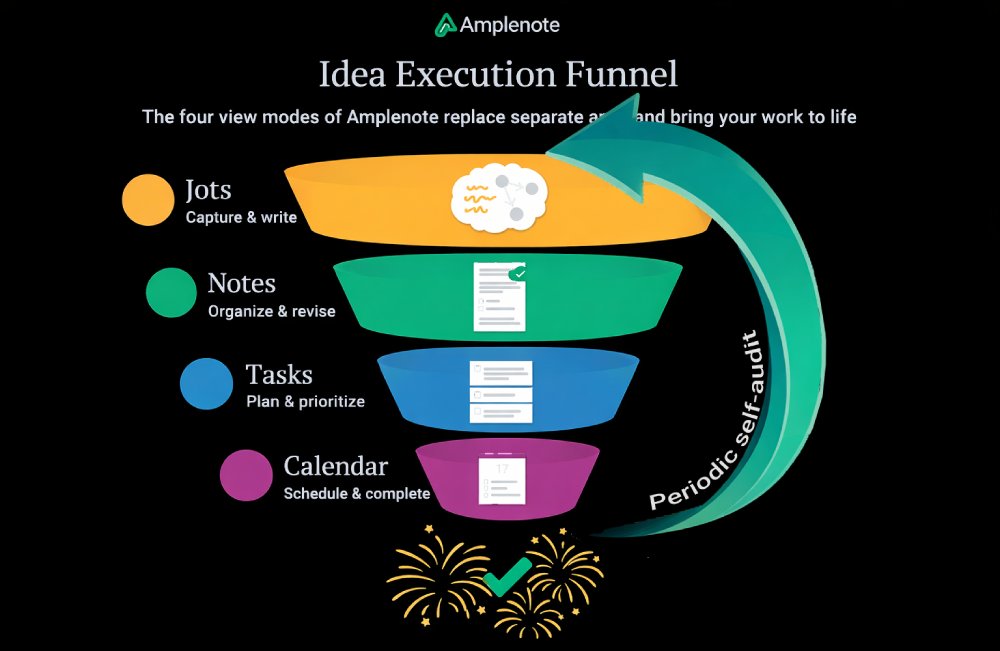
2025 focused on helping users relate their productivity level to "mental energy" and general "good vibes"
In that spirit, let's practice what we preach, and review 2025 to catalog: what happened, what we learned, and what goals it inspires for 2026?
Want to take action on your own year in review? Here's a free template we made for the occasion. ✨
linkWhat happened: Key improvements & upgrades from 2025
Let's revisit the highlights from the past 12 months, made possible by Amplenote's paying subscribers.
⚠️ Warning: This section is LONG (it's trying to cover a year's worth of upgrades from a busy team). Skim it to survive down to the "Learning" and "Goals" sections.
linkDecember 2025
AmpleAI Search Agent (in the AmpleAI plugin) was the headliner. Already, it is proving an exceptionally powerful & popular option to link together related notes... even if you named them poorly, or forgot to tag them when they were first created.
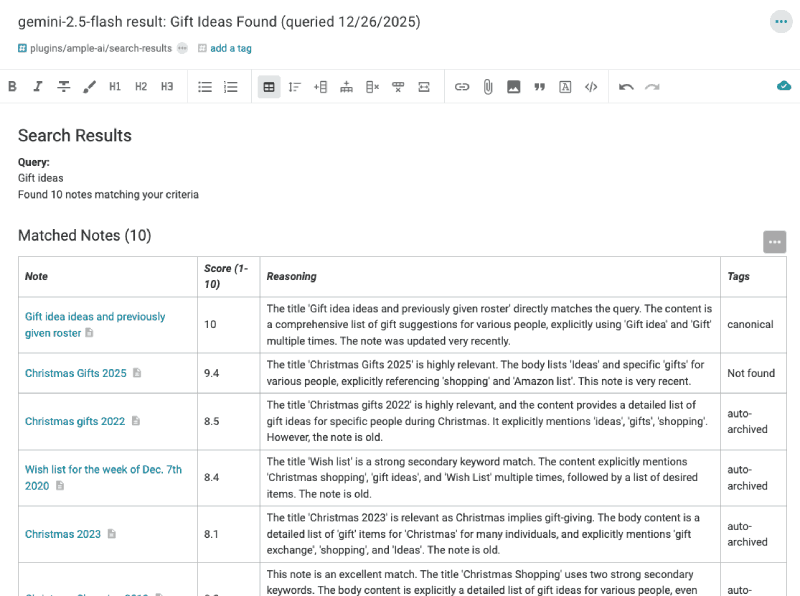
Use /search to collect every note you've ever taken on a particular topic, regardless of how it was originally labeled
Other December upgrades:
AmpleAI additions of latest models. Gemini (3 Pro), Claude (Opus 4.5), Grok (4), and Deepseek models are new defaults for AmpleAI users. The full set of functionality that AmpleAI offers can be invoked with whichever AI models are working best in a given month (bonus: recent real-world research evaluating "Gemini 3 Pro vs Opus 4.5 vs ChatGPT 5.2")
Allow embeddable sidebars on external sites. For our business customers who have figured out the serious advantages Amplenote offers as a Help Center platform, this update added the plugin hooks necessary to implement an embeddable sidebar: see demo, code and explanation.
Allow code block wrapping. For users with standard width notes, it was often challenging to read the code in a code block without a bunch of lousy horizontal scrolling. Now, you can toggle an option to wrap lines.
Improved Ctrl-Home and Ctrl-End behavior. Now, even when you have code blocks, tables, images, lists, etc that begin or end your note, you can still use Ctrl-Home or Shift-Cmd-Up to position your cursor at the very beginning of a note. This has been a game-changer for this help page writer.
linkNovember 2025
Task Digest emails were the biggest feature to soft-launch in November (and hard launch in December). They give users a concise rundown of the best tasks they've completed lately, and which imperative tasks are looming.
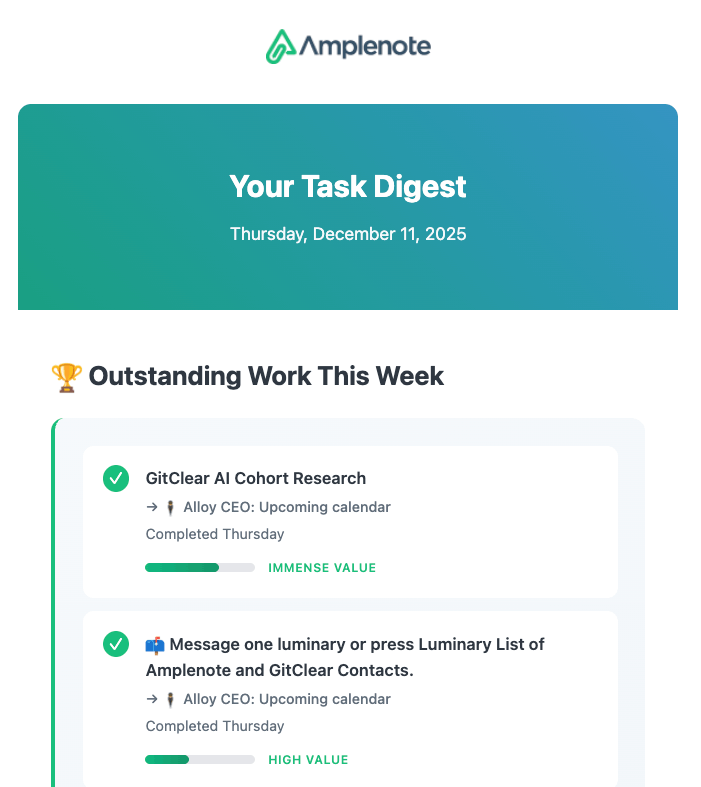
Remember your greatest achievements, and what deadlines/events you have coming
More November upgrades:
Improve ease of toggling between "Open" and "Completed" tasks. Now, both desktop and mobile have clear toggles in "Task" mode for switching between completed and non-completed tasks.
Quick to-do can add a task to a specific section. When using the # in your /move directive in a task, you can add a new task to a specific section within a desired note.
Append .md to a public note to see it as markdown. Very useful when referencing Amplenote pages for use by an LLM. If you want to get the markdown version of a help page, here's how to do it.
linkOctober 2025
Support Android edge-to-edge mode as part of our huge upgrade to the latest React Native (speed improvements, upgraded UI).
And a Founder Fave: Peek Viewer sticky headers, to make it awesome bearable to scroll through very long notes in the sidebar.

More October upgrades:
Show tasks with a deadline on calendar even when unscheduled. Previously, a task needed to have a Start Time chosen to shown on the calendar. Now, even if the task lacks a Start Time, it will still show on the day on which its deadline falls.
Upgrade React Native. App leaps forward 3 years in the features, and more importantly, the speed of rendering on mobile (especially Android) devices.
Fine-grained control of published notes. For users that use published notes, it's now easy to control the appearance of your published content, removing Amplenote branding if desired.
linkSeptember 2025
Add "Completed Tasks by Tag" graph to the "Completed Tasks" section. This feature is built to enhance quarterly & year-end productivity reviews, allowing you to precisely calibrate the extent to which your progress aligned with your intended goals during the month/quarter/year:
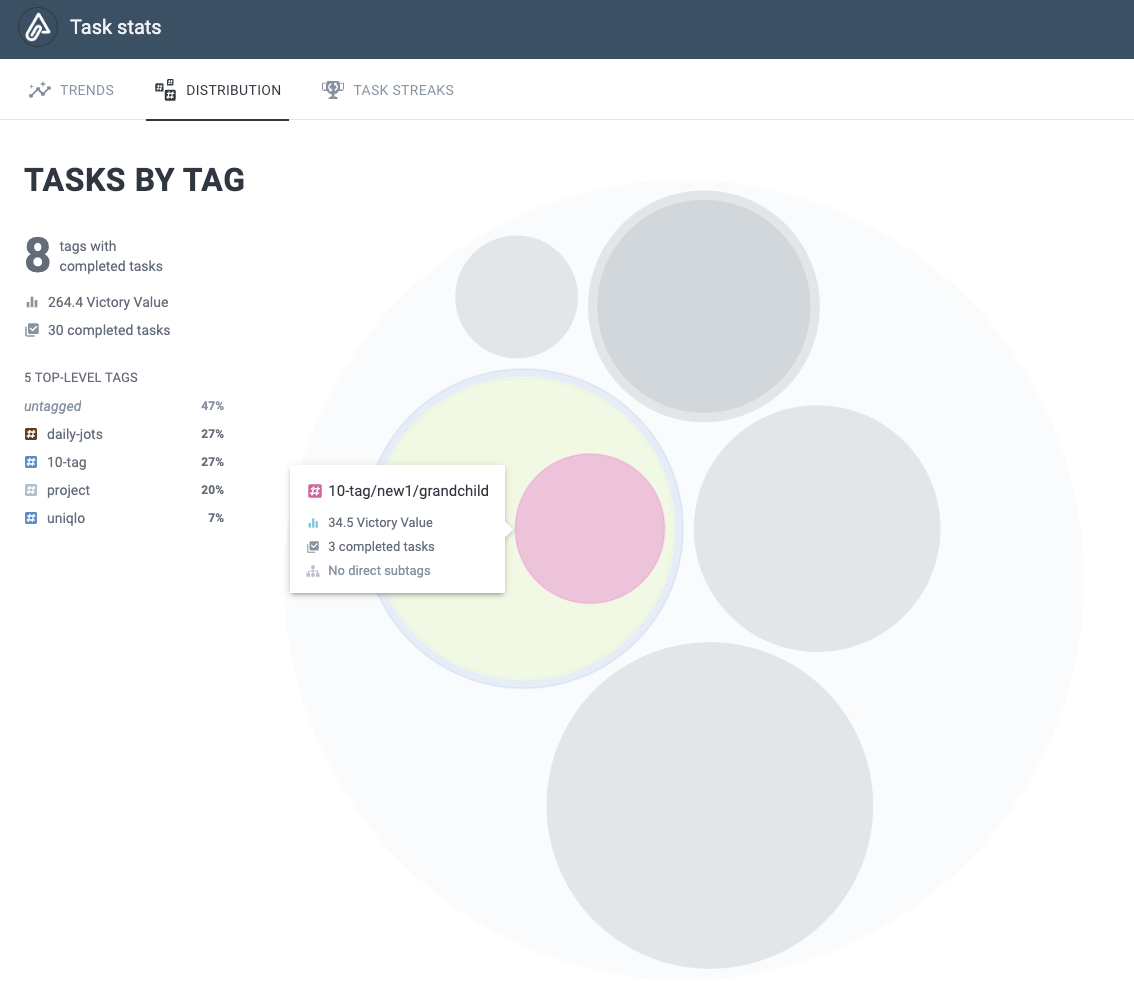
Where have you been making the most progress during a time-configurable range?
More September upgrades:
Add Task Streaks tab to Completed Stats. Build habits using the Duolingo-proven method of maintaining a task streak. Works great with flexible-recurring tasks.
Allow setting repeat interval during Quick Task popup. A very popular addition for users that are looking to build habits, or keep track of an ongoing responsibility.
Allow extracting Rich Footnote content to dedicated note. When editing a Rich Footnote that has details beyond a URL, a new option to "convert to note" will extract those details to a new note, converting the Rich Footnote to a link to that note.
Allow filtering Completed Tasks by date range. Useful when you're reviewing history to understand what made a particular time period so productive, or not.
linkAugust 2025
Configurable Completed Task Stats. This marks a new point of differentiation between Amplenote and similar task management/LifeOS apps. Every app gives you easy ways to capture tasks. Some apps allow drag-and-drop options to translate your cache of ideas into an agenda.
But what about the follow-through? Almost every productivity expert recommends doing periodic reviews (ideally monthly, at least quarterly) of what you've gotten done & where your energy should next be directed. The graph of Completed Tasks lets you see what has been going well, and which areas of your plan you are falling short. This lets you "close the loop" to allow past progress to inform your future priorities.
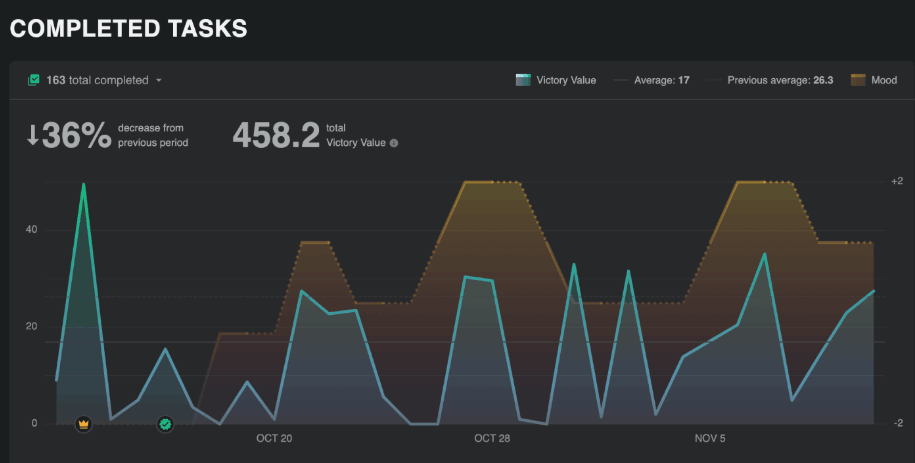
The Task Stats icon opens detailed information about how productivity has overlapped with mood
More August upgrades:
Monthly completed tasks by tag breakdown. The perfect gateway to answer questions like "How much of my time was spent servicing different clients, or different job responsibilities? Am I spending more time in meetings than I thought?"
Visualize subset of completed tasks. Allows analyzing a specific subset of completed tasks, when you want to get a sense for the rate at which you're working on Important tasks.
Allow setting "max open tasks per tag". Perfect for users who mainly work on tasks in daily jots. With this option, you'll be able to get a sense for when your cumulative tasks are getting to a level where it would be smart to start dismissing the oldest ones.
Update the Starter Notes pack to video links. Now that we have a wide variety of Amplenote instructional content, we've added links to the most popular videos in the notes offered to new users.
linkJuly 2025
Add mood rating as first-class UI element on desktop and mobile. This lets us configure Completed Task Stats to graph the degree to which "productivity" is accompanied by "happiness." It's a common story to hear that "great productivity comes at the expense of working on what you enjoy." That's a crappy way to live, so we are taking a page from Jim Collins, Tim Ferriss and Cal Newport, and recommending that users generate data on how they've felt as they tackle the quarterly plan they made.
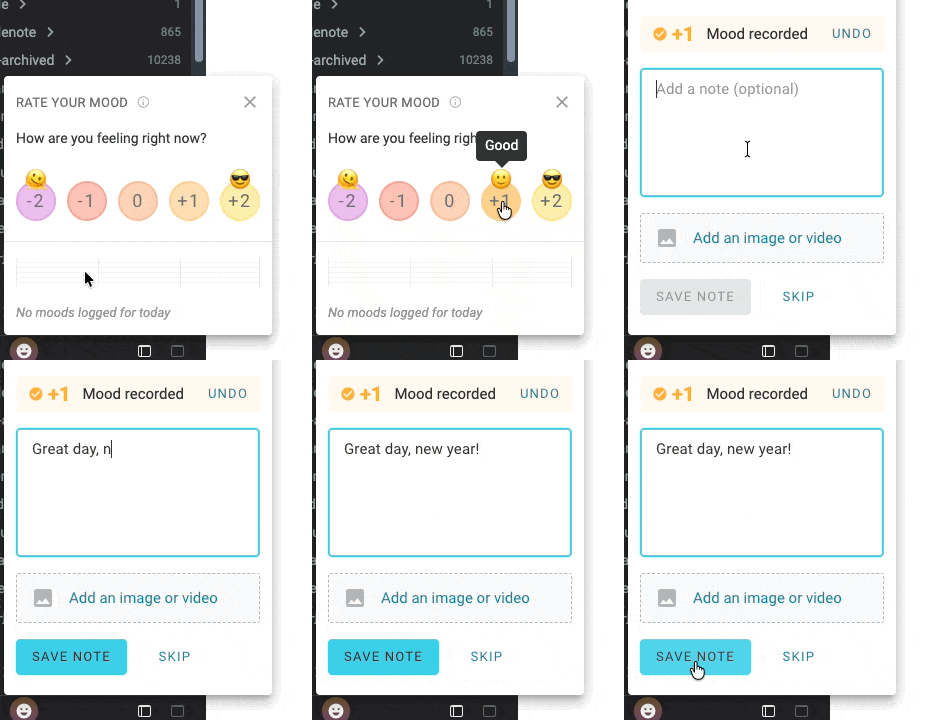
Mood ratings: What gets measured, gets improved
More July upgrades:
Audio files in Rich Footnotes. When you open the link menu for a particular phrase, it's now possible to upload an audio file (mp3, flac, etc) to embed audio within your prose
Plugin embeds: Allow plugins like Excalidraw, Kanban, and Search Agent to open their own windows to create custom experiences.
linkJune 2025
User-configurable task completion. As of this update, Amplenote can be equally functional for the users who come from an Evernote background, expecting a "completed task" to remain in the note, or those that come from a "task app" background, where they expect a completed task to be removed.
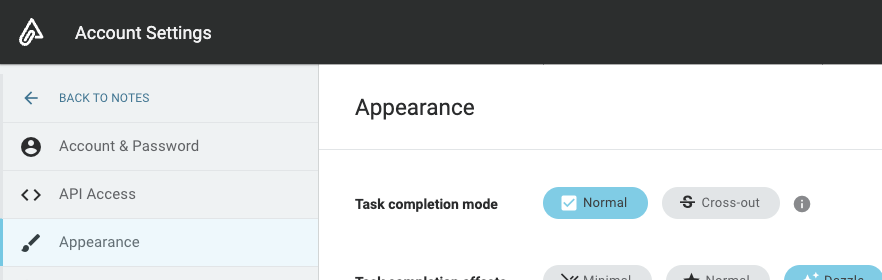
Set a global default for how completed tasks are handled in notes and jots
More June upgrades:
Task filters include Inline Tagged tasks. You have to be a moderately big nerd to get excited about this. But if you clear that threshold, you're going to get very excited about referencing a note in order to have a task included in its Task Domain and task filters. ✨ A repeated user request.
Control whether external calendars show completed events. Some users don't like to leave a history of their completed tasks on external calendars. It's now the default.
Selection-based Slash Commands. Manipulate groups of tasks or other batch text after entering a slash.
linkMay 2025
Task deadlines: A way to specify a task needs to get done without specifying exactly when (with a Start Time), while ensuring very noticeable Task Score to a task whose deadline has arrived:
More May upgrades:
Launched initial videos for Amplenote Explained. This is now our default recommendation for people that want to learn the best Amplenote tactics, straight from the team.
Fine-grained publishing control. Suppress Amplenote branding, view count, and author info. If you're still using Zendesk for your Help Center, reach out to hello@amplenote.com and we can give you a demo of a better+cheaper Help Center experience.
Upgrade to Material Design 3. Upgrade design library used in editor
linkApril 2025
Global task capture in Ample Desktop. This has continued to improve throughout the year, and will improve even more during Q1 2026, when we're about to apply a bunch more data to guessing which notes the task should be added to. But it was a happy day in Q2 when we finally made it possible to jump straight into an Amplenote "Task adding" dialog with a single key strike!
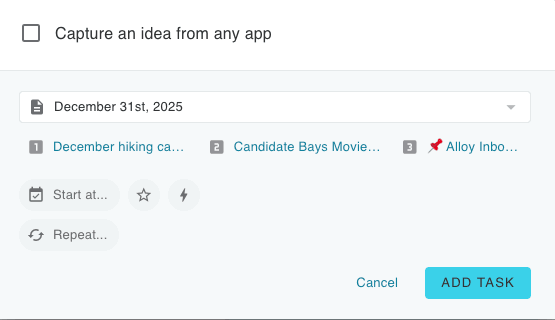
Ample Desktop users: pick a global hotkey, get instant todo list access ⚡
More April upgrades:
Task tray icon. Jump straight into notes, or any other Amplenote pane.
Amplecap bookmarks mode. Use AI to apply some cool transformations to your imported Amplecap content
Tag-based auto-archive control. Some users are wary of the effects of auto-archive. This gives a per-tag opt-out, to ensure that all your historic notes and tasks are available from the calendar and elsewhere.
linkMarch 2025
Slash menu. Took awhile to get around to it, but once we finally got to it, it became a real cornerstone for everyday use cases.
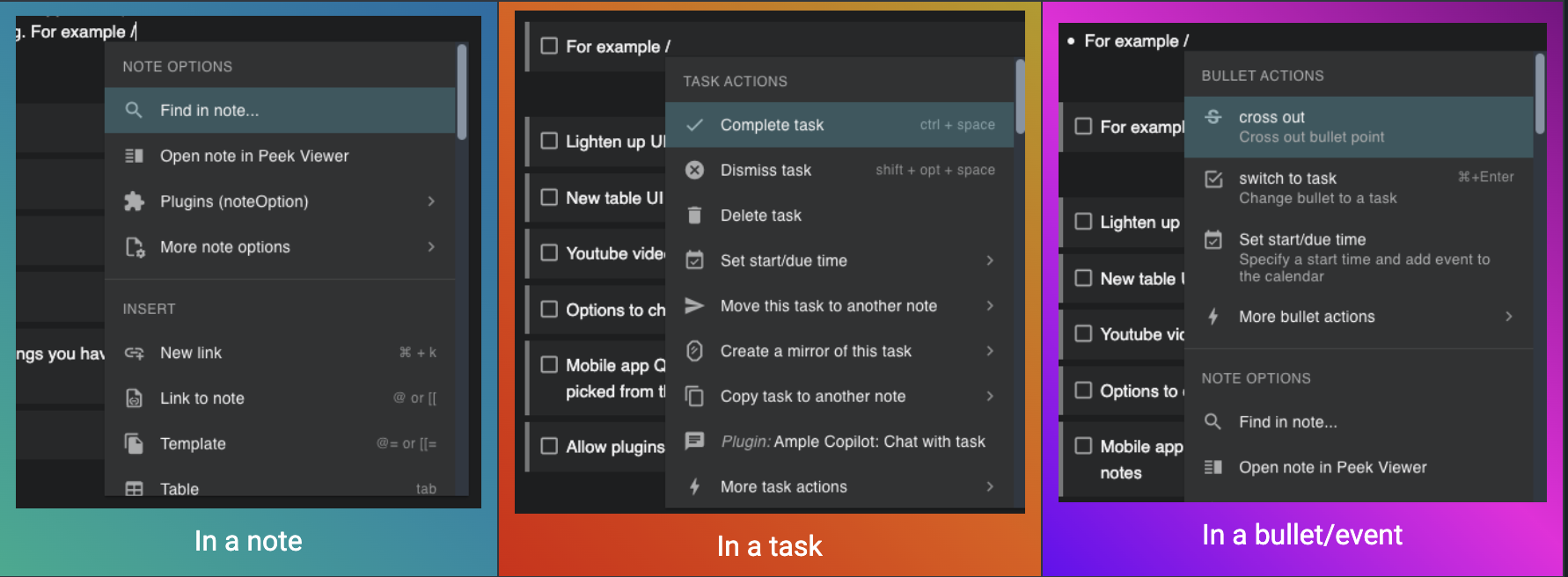
More March highlights:
Tiago Forte: Amplenote as a LifeOS. Lots of great ideas about how to use Amplenote effectively.
Add option to leave 1-5 ⭐ reviews for plugins. This has made it possible for users to get a much better sense for which plugins are going to be a positive experience.
Lighten up UI. This was one of the most upvoted user tasks of the year, so feels like it deserves a spot.
linkFebruary 2025
Sync notes to file system. The ultimate peace-of-mind for users that were worried about "what if the Amplenote cloud disappears?" Even though Amplenote has offered a full offline mode since launch, it makes sense that when we're talking about a LifeOS-type app,
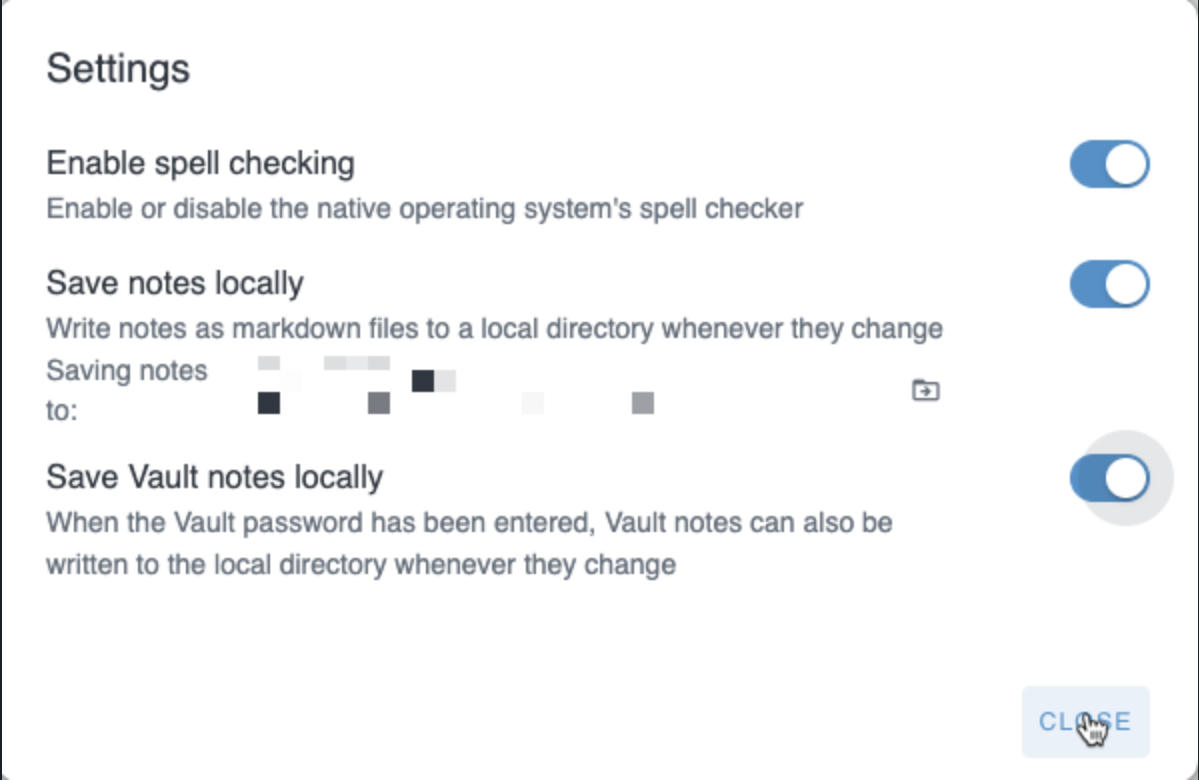
More February highlights:
Emoji selector arrows. O' fine and glorious day; emojis aplenty, only an arrow away
Table selection menu. Easy access to add columns & rows to a table, especially on mobile.
linkJanuary 2025
Embeddable Youtube videos in embeddable notes. The feature that set the stage for our later advocacy that more users should consider Amplenote for building a best-of-breed Help Center, featuring Rich Footnotes and help pages that update as easily as changing text in a note. Because any higher barrier to change is going to ensure stagnant help documentation.
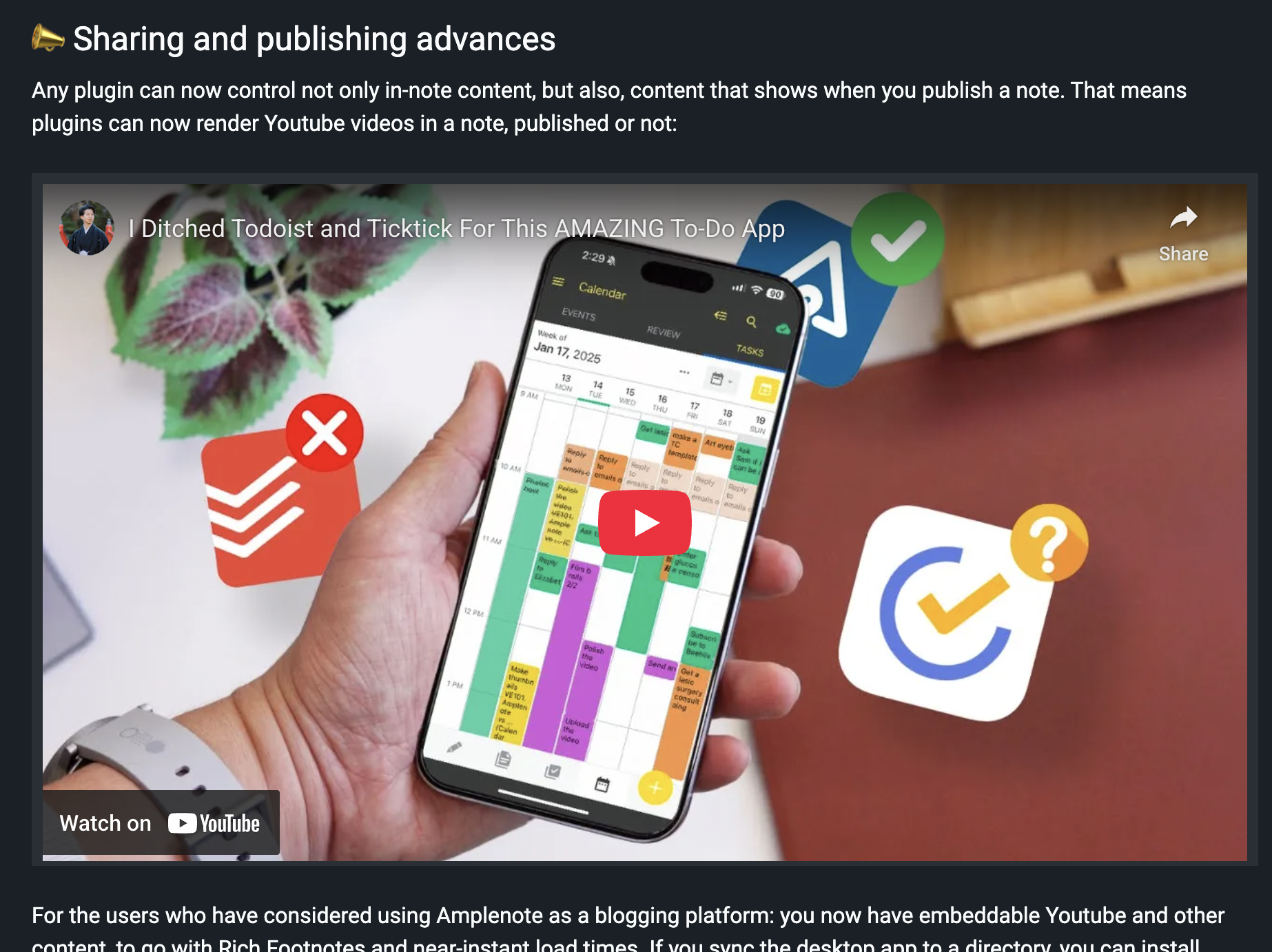
A Youtube video embedded in a published note. Great for using Amplenote as a wiki, Help Center, and other documentation
More January upgrades:
Retain formatting when entering text in front of a word . A small, frequent annoyance felt over the years -- most editors, including Amplenote, make it a real pain to enter text in front of a bold/italic/linked word. As of this update, you can add text in front of a word without an elaborate dance to retain formatting.
Launch of Ample Copilot plugin. AI plugin that integrates a chat interface and natural language search into Amplenote.
linkWhat we learned
This year taught us much about the balance between "maximizing productivity" and "maximizing enjoyment." For users that tap the benefits from logging energy/mood, it's suddenly possible to glimpse how the arc of time gives rise to some wonderful weeks interspersed with "gut check" weeks.
How to convince the general public of the benefits that emerge from daily self-measurement? 🧐 The reality is we probably won't convince the general public. Most people are too busy juggling infinite distractions to stop and reflect.
We're pandering to the subgroup of "doers" who look for every opportunity to pull themselves up to a new echelon of GSD potential. The possibilities unique to this moment in history are inspiring. During a recent podcast, Marc Andreessen had a soundbite that helped me notice what's truly unique about this moment we are living in:
linkAI is hyper-democratizing
Here was how Andreessen put it:
The first computers—mainframes—were only for the government and the biggest corporations first. Then personal computers were for businesses first, then consumers. AI is the first technology that is in the hands of the consumer first and the government last.
And that is exactly what makes this era so weird, or "unprecedented" as the marketers would say. The intense struggle between LLM providers racing to win our hearts & minds is arming small businesses with tools better than what is available to the "big boys." Anybody with an open mind and a willingness to experiment can seize initiative, to achieve feats that would have been super-human even five years ago.
linkWhat we're planning for 2026
As usual, our roadmap is driven in large part by the votes of our users, especially our subscribers.
Beyond servicing our customers use cases, there are a few areas we know will receive focus during the first half of 2026.
link💸 Plugin Builder Bonuse$
Amplenote's Plugin Marketplace has been a rich and growing source of inspiring functionality. For this January, we have an update ready that will allow plugin creators to send update messages to plugin installers (up to once per quarter), to create incentive to get plugin developers engaging with plugin users, to iterate the v1 plugins into v2 and v3, when they start to get seriously powerful.
Amplenote's contribution to creating a virtuous cycle of benefit? Once we finish implementing the details, we will begin paying monthly bonuses of $600, $300 and $100 to the three plugins that receive the most positive feedback that month from paying Amplenote subscribers. We expect to create a leaderboard to let plugin authors see how close they are to earning one of the monthly bonuses. If you have created a plugin, or are thinking about creating one, there has never been a better time to take a look at what Amplenote subscribers and users are asking for, and consider using the latest AI Coding Tools to implement your vision.
link✅ Task Planning and Performing AI
2025 was the first year where leading-edge AI agents could be trusted to plan and undertake seriously time-saving steps to process items in a todo list. In particular, having the LLMs become proficient at image analysis opens the door to them being able to utilize Rich Footnotes in tasks to understand how to take the next step to advance toward your goals.
Now that AmpleAI has finished integrations with Google Gemini, Anthropic Claude, OpenAI ChatGPT, Grok, and Deepseek, our users have access to whichever thinking engine seizes the lead for a given month of 2026. This is going to unlock all sorts of fun and interesting upgrades for Amplenote customers:
Use /plan to decompose a complicated task into a note with actionable tasks to start making progress on a complex goal
Use /execute to send your LLM of choice on a mission to actually undertake the plan that is described in a note
Integrate with your quarterly & monthly plans to suggest which available tasks will do the most to benefit you
Connecting Amplenote tasks with state-of-the-art LLMs has taken shape as a Q1, number 1 priority goal for us.
link🔭 Mission Control Dashboard
This one is halfway through the "brainstorming" phase so far. But, soon, we will allow plugins to render content into a customizable user dashboard.
At the moment, Jots suggestions are the main opportunity to discover contextually relevant links when you're taking stock of your day. We can do better. We will build a dashboard that lets you create a first-class "Quarterly Plan." We'll use your plan to nudge you toward the stuff that matters as you plan each day. Meanwhile, our mandate is to help judge: are you having fun doing all this work?
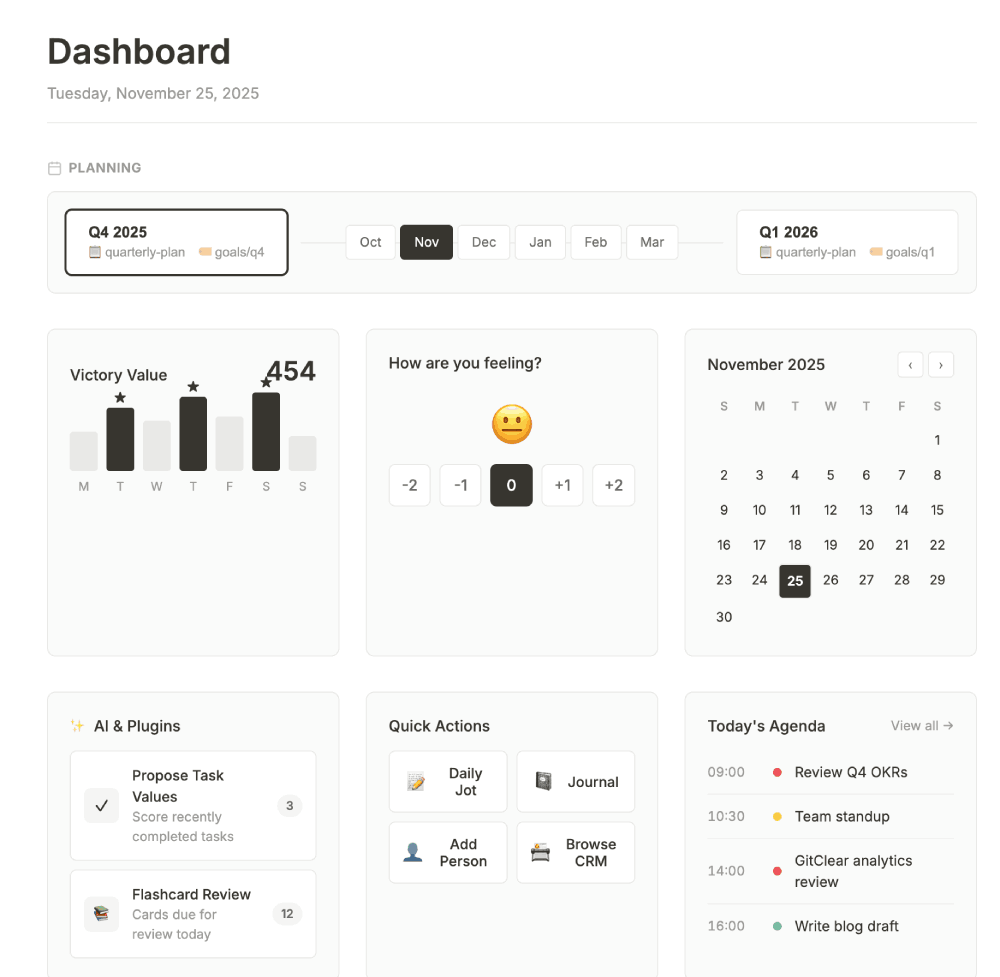
Early concept for an Amplenote dashboard to consolidate key functionality in a single, configurable page.
How would you design it?
The dashboard is likely to arrive closer to Q2 than Q1, but we recognize the potential to kick start users as they're getting started building the plan for the week, or the day. The key is to let your carefully considered quarterly plan to help inform where your time is spent. And if you're not already making quarterly plans, we're going to nudge you to try. So many of the best productivity thinkers talk about long-term planning as the essential ingredient to steer toward your ideal lifestyle.
linkWhat about you: What did you learn? What do you want to see?
With an environment that's changing at unprecedented speed, we rely on our users more than ever to relate their use cases.
Got a fave feature of 2025?
Any hopes and dreams for 2026?
What's the coolest task or calendar upgrade you have seen or read about elsewhere? (Have you actually used it, vs just sounding cool?)
Drop a line in the comment if time allows? And thank you for sticking with Amplenote as we continue to crank up the focus on delivering pragmatic, leading-edge features that help to optimize productivity and +2 days. This marked our fifth straight year of user growth: given how much less we spend on advertising than our institution-funded competitors, we are especially indebted to the community that is helping steer us toward an approachable blend of "fast capture," "automatic organization," and ultimately, a future where every new year leaves you wiser than the year before.

Since you asked :) My favourites were just the quality-of-life improvements. Small fixes and improvements here and there. I feel like Amplenote has reached a point where the core featureset is so strong that (aside from how AI will shape things in the future) new features are less important than getting the existing ones to work flawlessly. But that is just my opinion. And by flawless I mean ironing out quirks such as “if global task completion mode is set to cross-out, but note-specific task completion mode is changed, then completing a task inside the note means the completed task is only listed below note content as it should, but then completing a task belonging to the same note in Tasks view results the completed task to be crossed out instead of removed from the note content.”
As for 2026, the small but important improvements that I would like to see include:
- 24h clock (honestly, how come we still don’t have it!)
- Ability to open individual notes in separate windows on the desktop app (now it’s just cumbersome either have to use web browser when this is needed, or desktop app + web browser together).
- Automatically updating Table of Contents for notes.
- Files attached to notes to be viewable (and attachable, to keep the note content clean in some cases) in the bottom section as an additional tab alongside hidden and completed tasks, and backlinks.
- Customisable keyboard shortcuts at least for the core UI functionality. My main issue is switching between views in Notes view (3 panels, 2 panels, and just the note content). With a nordic keyboard layout those shortcuts simply do not work.
- Default saved task filter in Calendar view (also, speaking again of improving existing functionality: I clicked on the star icon of a saved filter on mobile and it deleted itself. Nothing in the UI indicated this would happen. I would have expected it to set it as a default filter, similar to how default shortcut in Tasks view is selected.)
When it comes to a “coolest task or calendar upgrade” this again is such a simple and old thing, but has so much importance for usability that it baffles me why it isn’t done by every calendar app: being able to have both weekly view and the dates for the whole month side-by-side at the same time. Just look at how Fantastical does this on their desktop app. It makes it so much faster to check which weekday a specific date is, or to jump a few weeks forward with a single click.
Forgot to mention another 2025 favourite in the previous post: local storage for notes when using desktop app. That peace of mind truly matters and is much appreciated.
I'm loving the idea of dashboard!
For other nice-to-haves are:
- 24h clock
- tasks in a hierarchical view in task list and calendar
- standard date pickup dialogs (really, those 1-2 more clicks on mobile are frustrating when wanting to add something really quickly to not loose focus)
- "shopping lists" - list of points we can cross out, but are not separate tasks. Super useful for shopping lists and as high-level checklists.
Features I'd like to see:
- Support checkmarks that aren't tasks, so they don't get deleted when you check them. I tried the inline checkbox plugin, but couldn't get it to work.
- Automatically update Table of Contents in notes
Got a fave feature of 2025?
Completed Task Stats
Any hopes and dreams for 2026?
- Local storage for notes
- Kanban view
- Compatibility with Hookmark https://amplenote.featureupvote.com/suggestions/132950/to-have-compatibility-with-hook-productivity
Thank you for the product. Amplenote has become the hub of my life.